Figma AI: The Native AI Agent Transforming UI Design with Prompts
Discover Figma AI, the native AI agent that generates interfaces, automates design systems, and accelerates UX/UI prototyping directly inside Figma.

Figma AI: The Native AI Agent Transforming UI Design with Prompts
Artificial intelligence is now built directly into Figma and this time, it’s more than just another plugin. With its new native AI agent, Figma aims to automate a massive part of the UX/UI workflow: interface generation, contextual editing, prototyping, microcopy, design systems, and even image editing.
For designers, frontend developers, and product teams, this could completely reshape the speed of ideation and production.
What Is Figma AI?
Figma AI is an integrated AI agent capable of understanding the context of a design file:
components,
variables,
layout constraints,
design systems,
naming conventions,
and existing UI structures.
Unlike generic AI tools, it works directly inside the canvas and generates editable design elements native to Figma.
Core Features
Generate UI from prompts
Edit existing frames contextually
Create component variants automatically
Rename layers intelligently
Generate UX copy and microcopy
Translate and shorten text
Edit and generate images
Add prototype interactions
Run multiple agents simultaneously
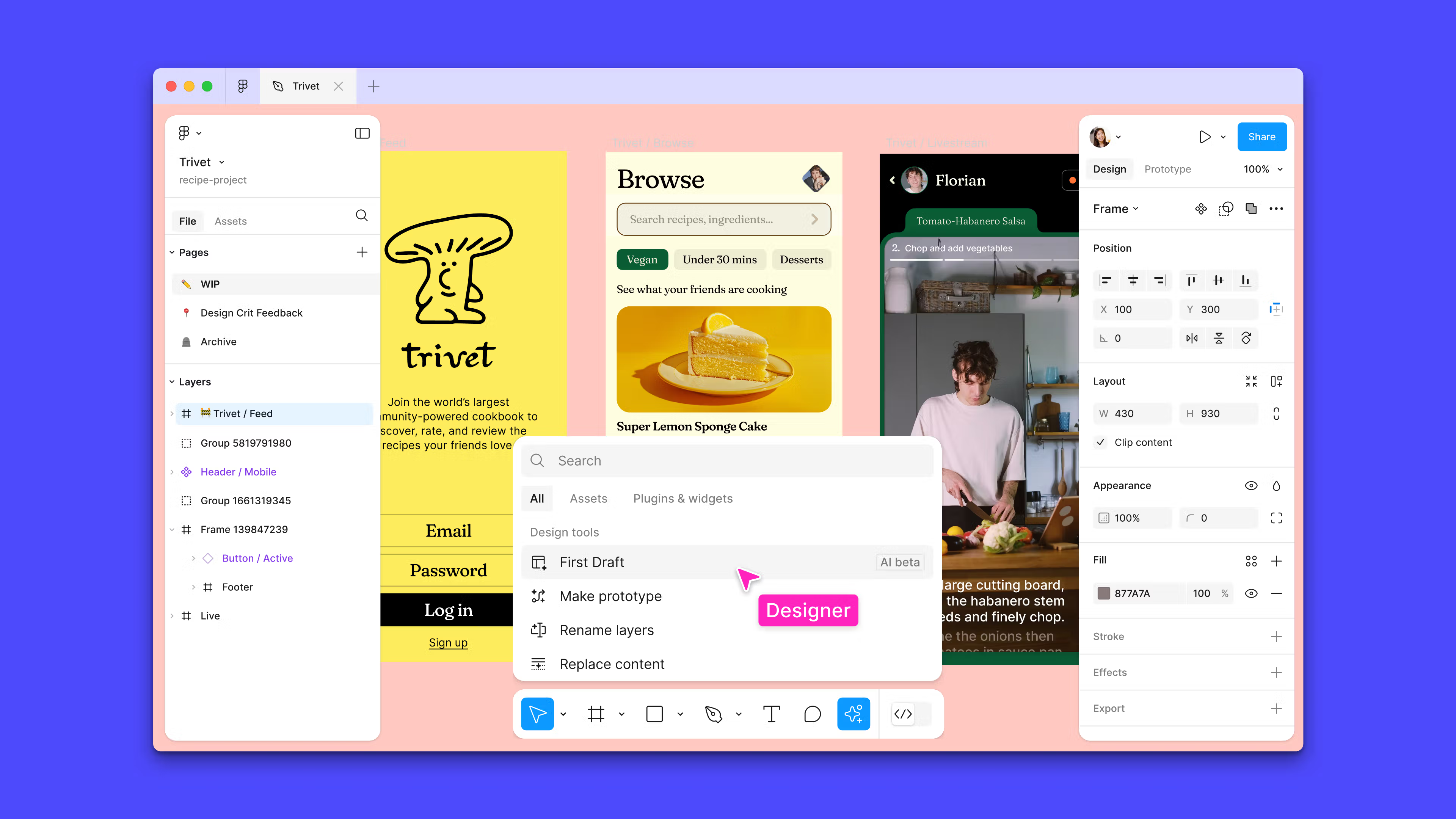
UI Generation with “First Draft”
One of the most impressive features is First Draft.
You simply describe an idea:
“Create a modern SaaS landing page with a hero section, blue CTA, and analytics dashboard.”
The AI then generates a fully editable mockup in seconds.
What makes it powerful:
components remain editable,
auto-layouts are preserved,
responsive constraints stay intact,
and styles can follow your design system automatically.
AI That Understands Design Systems
This is probably the biggest advantage.
Figma AI doesn’t just generate pretty screens.
It understands:
tokens,
variables,
components,
variants,
naming systems,
and file structure.
The result:
more consistent interfaces,
cleaner layer organization,
and smoother design-to-development workflows.
Automatic Layer Renaming
Every designer has seen this at some point:
Rectangle 342
Group 17
Frame copy final final v2
Figma AI can automatically:
rename layers,
organize groups,
restructure components,
and apply consistent naming logic.
Example
Before:
Frame 1
Rectangle 45
Text 12
After:
Product Card
CTA Primary Button
Hero Title
This becomes incredibly valuable for large product teams.
UX Copy & Microcopy Generation
The AI agent can also handle:
UX writing,
CTA generation,
placeholders,
descriptions,
translations,
and text condensation.
Example Prompts
Generate concise onboarding copy for a fintech appRewrite this CTA to sound more premiumTranslate all screens into FrenchBuilt-In Image Editing
Figma AI also includes image generation and editing capabilities such as:
background removal,
image enhancement,
AI-generated visuals,
and smart image replacement.
Prototyping & Interactions
Figma AI can help:
connect screens,
create user flows,
add micro-interactions,
and generate interactive prototypes.
Example:
“Add a smooth transition between onboarding and dashboard.”
The AI automatically configures animations and interactions.
Multi-Agent Workflows
Figma is also experimenting with multi-agent workflows.
Multiple agents can:
work on different project sections,
generate multiple variations,
document components,
and create complete flows simultaneously.
This is especially interesting for:
enterprise product teams,
large-scale design systems,
and design-to-code pipelines.
Which AI Models Does Figma Use?
Depending on the task, Figma may rely on different AI models including:
Gemini 3.0 Pro
GPT Image 1
for:
text generation,
image generation,
contextual understanding,
and UI creation.
Limitations & Things to Consider
Even though Figma AI is impressive, there are still important limitations.
1. Human Review Is Still Necessary
AI can:
break visual hierarchy,
create weak contrast ratios,
miss accessibility issues,
or generate inconsistent layouts.
2. Privacy & Data
Companies should carefully review:
how files are processed,
data policies,
and AI training practices.
3. Vendor Lock-In
AI-powered workflows may become heavily tied to the Figma ecosystem.
Why This Could Be Huge
Figma AI could become for design what GitHub Copilot became for software development.
Potential benefits:
faster ideation,
reduced repetitive work,
better prototyping,
accelerated product development,
and smoother collaboration.
Most importantly, we’re starting to see the rise of agentic design workflows.
Ready-to-Use Figma AI Prompts
Generate a Dashboard
Create a modern SaaS dashboard with analytics cards and sidebar navigationConvert to Dark Mode
Convert this design to dark mode while preserving accessibility contrast ratiosGenerate Documentation
Generate documentation for all components and variants in this fileRefactor a Design System
Replace all inconsistent buttons with design system variantsCreate Mobile Onboarding
Create a 3-screen onboarding flow for a fitness mobile appDid you enjoy this article?

Written by
Chris
Tech builder · Agentic AI & offensive security
A tech-obsessed builder, I'm building Sentinelle — an autonomous offensive-security AI agent. I write here about agentic AI, AI-assisted pentesting, and what I learn shipping offensive tooling.